Wednesday, February 13, 2013

10 Ways to Seem Smarter than You Are


10. Learn a topic to debunk

    The majority of “hot topics” are debated by people with very little knowledge of the subject. A good example of this is global warming – the majority of people you speak to on this subject will tell you how we must change our habits to prevent global warming, but few will know what “anthropogenic global warming” is. Spend a little time learning what the real experts on these faddish topics say and you simply can’t go wrong. Try to remember some of the names of authors so you can quote them.

9. Improve your Vocabulary

    The simplest way to do this is to subscribe to a “word a day” emailing list. Remember to ensure that you memorize the correct pronunciation and spelling of the new word or phrase. Perhaps you can start with mesonoxian, or any of the words on the Top 10 Weird English Words.

8. Obscure Knowledge

    By developing knowledge in a very obscure area, you are very unlikely to meet someone else with the same knowledge. This means you can wax lyrical for hours and it doesn’t matter how many mistakes you make – no one will know, and you will seem ultra-smart. You might, for example, spend some time studying the early Egyptian dynasties (or an interesting character like Smenkhkare,) or the writings of early Christian writers. You can be sure that even the most staunch Southern Baptist fundamentalist has never heard of most of the “fathers of the Church”, let alone read anything they wrote. Saint Igantius of Antioch is a good start; you can follow up with Athenagoras, Irenaeus, Origen, Novatian, and Polycarp. Great subject matter for the Atheist who wishes to debate against fundamentalists.

7. General Knowledge

    This can be done very easily. Buy a Trivial Pursuit (Genus Edition) and memorize one card before going to bed each night. In no time you will have a fount of general knowledge so immense that no one will dare debate you at Friday night drinks. The other thing you can do to improve general knowledge is to read “This day in History” articles. Luckily, the List Universe prints a “Today in History” list on the right hand side of every page (underneath the latest 10 comments) with links to Wikipedia to get you started. Good Lord! I feel smarter just thinking about it!

6. Ask Questions

    The best way to use this trick is to ask questions when you already know the answer. This is a form of Irony when used in the right way; when the person you are questioning answers, you can ask a related question which will make it appear that you have taken in what they said, absorbed it, and wish to clarify an aspect of the topic. Additionally, when you are discussing a subject with someone who clearly knows less about it than you, you can ask questions that you know will make them stumble. This is particularly good if you have a large audience as everyone will be in awe of you. Make sure you are humble when the person’s weakness shows.

5. Learn About Good Books

    Sparknotes. I repeat, sparknotes. Use the short notes found on this site to get a broad overview of famous classic novels. You only need to learn enough to make it seem that you have read the book. For a decent classic you should be able to do this in 30 minutes or less. And who knows, you may find that you want to read the book and gain some real intelligence.

4. Watch Movies

    Watch some classic movies that are both good and bad. These movies don’t have to be silent movies, black and white, etc. Just good movies, fulfilling movies. Also, watch some bad movies. Someone who can spout off one or two good movies will sound either smart or fake. But someone who can state both good and bad movies, and justify why each is classified that way, will sound intelligent.

3. Learn Quotes

    A great writer once said: “Most people are other people. Their thoughts are someone elses opinions, their lives a mimicry, their passions a quotation.” – while this is amusing, it is not entirely correct when trying to appear smarter. People will be utterly in awe of you if you can quote a famous line from poetry, a great play, or a witticism by a literarary master. There are a million sites on the internet that will help you to find quotations. Learn one a day. If you wish to learn a few lines of poetry, I recommend starting with Plath, Ginsberg, or Whitman; everyone knows who they are, but few will be able to quote them. Oh – the quotation I used here is by Oscar Wilde.

2. Use Words you Know

    Nothing makes you looks more like an idiot than fumbling language. Stick to what you know! People will argue that tapes and books can teach you new words, but you still risk a terrible mistake. Learning new words can broaden your thinking and amplify your ability to communicate. However, doing so will open you up to appearing stupid, so you should stick with words you are 100% positive of pronunciation and meaning. Even if it takes you an entire extra sentence to explain a concept that one word would have clarified instantly, it’s totally worth it.

1. Be Quiet

    Quite simply, the less you say, the less you can say wrong. Oh, and smile and nod knowingly.

Thursday, December 27, 2012

[OS X] How to Create a Tar GZip File from the Command Line


Everyone uses built-in compression functionality of Mac OS X with a simple right click. This is useful when you need to compress certain files and send them over email or store them using time machine. However, there are times when you need some advanced options during compression. It’s mostly required when you need to take backup out of Time Machine or you want to transfer data to some other backup server. We are going to discuss one such compression command called “tar”. The command to create a tar / gzip file from the command line is exactly same as we use in Unix.
Open the Terminal window  from /Applications/Utilities/Terminal and follow the instructions below -

How to Create a Tar GZip File from the Command Line

tar -cvzf compressedfile.tar.gz foldername
The command above looks quite easy, but the flags -cvzf have all the secret inside. Let’s understand these one by one -
  • -c  means create an archive
  • -v  means verbose mode, if specified you will see the list of files running through your screen.
  • -z means gzip compression, if specified it will filter your zipped file i.e. tar files via gzip compression.
  • -f means filename
In the above syntax is not really required, you can create an archive without having to specify gzip compression. But it’s very useful, as it’s responsible for actually compressing the size of the resultant file.These two commands can also be used separately.

How to unzip or untar tar.gz files

Now it’s time to see how can we unzip or extract theme compressed files. You can always use the unarchiver app in Mac, but let’s see how it can be done from command line.
gunzip compressedfile.tar.gz
and then..
tar -xvf compressedfile.tar
We can combine these two commands similar to what we do in Unix. And the above two commands will look like -
gunzip compressedfile.tar.gz | tar -xvf compressedfile.tar
Hope that helps!
Jigar


Monday, June 4, 2012

Guake Terminal Awasome Tool

Last Day I was looking on Ubuntu App and I found excellent terminal tool "Guake" Termina.

Guake is a drop-down terminal for GNOME Desktop Environment. Like similar terminals, it is invoked with a single keystroke, and hidden by pressing the same keystroke again.
Running Guake is faster than launching a new terminal with a keyboard shortcut because the program is already loaded into memory, and so can be useful to people who frequently find themselves opening and closing terminals for odd tasks.

Once you Run it. It is Very easy to invoke Just Press F12 and you have terminal dropping down from up and if youw ant full screen same screen press F11 and Ease of USB is you still have that old feature Ctrl+Shift+T New tab, or Tab up and Tab Down.

Loved it. :)


Sunday, June 3, 2012

Brief About Object-Oriented Programming and Python


 Mostly we have designed our python program around functions or blocks of statements which manipulate data. This is called the procedure-oriented way of programming. 

     There is another way of organizing your program which is to combine data and functionality and wrap it inside what is called an object. This is called the object oriented programming paradigm. Most of the time you can use procedural programming but sometimes when you want to write large programs or have a solution that is better suited to it, you can use object oriented programming techniques.

Classes and objects are the two main aspect of object oriented programming. 

  • class creates a new type where objects are instances of the class. An analogy is that you can have variables of type int which translates to saying that variables that store integers are variables which are instances (objects) of the int class.
  • Objects can store data using ordinary variables that belong to the object. Variables that belong to an object or class are called as fields
  • Objects can also have functionality by using functions that belong to a class. Such functions are called methods of the class. 
  • This terminology is important because it helps us to differentiate between functions and variables which are separate by itself and those which belong to a class or object. 
  • Collectively, the fields and methods can be referred to as the attributes of that class.

Fields are of two types - they can belong to each instance/object of the class or they can belong to the class itself. They are called instance variables and class variables respectively.

     A class is created using the class keyword. The fields and methods of the class are listed in an indented block.

Now Python Class Have One special SELF parameter so let's understand it first :

The self

     Class methods have only one specific difference from ordinary functions - they must have an extra first name that has to be added to the beginning of the parameter list, but you do do not give a value for this parameter when you call the method, Python will provide it. 

      This particular variable refers to the object itself, and by convention, it is given the name self.

     Although, you can give any name for this parameter, it is strongly recommended that you use the name self - any other name is definitely frowned upon. There are many advantages to using a standard name - any reader of your program will immediately recognize it and even specialized IDEs (Integrated Development Environments) can help you if you use self.

How it works :
     You must be wondering how Python gives the value for self and why you don't need to give a value for it. 
     An example will make this clear. Say you have a class called MyClass and an instance of this class called MyObject. When you call a method of this object as MyObject.method(arg1, arg2), this is automatically converted by Python into MyClass.method(MyObject, arg1, arg2 - this is what the special self is all about.

     This also means that if you have a method which takes no arguments, then you still have to define the method to have a self argument.


Now Classes

The simplest class possible is shown in the following example. Example Creating a Class


#!/usr/bin/python
class Person:
pass # An empty block
p = Person()
print p

Output

$ python simplestclass.py
<__main__.Person instance at 0xf6fcb18c>


How It Works

     We create a new class using the class statement followed by the name of the class. This follows an indented block of statements which form the body of the class. In this case, we have an empty block which is indicated using the pass statement.
    Next, we create an object/instance of this class using the name of the class followed by a pair of parentheses. For our verification, we confirm the type of the variable by simply printing it. It tells us that we have an instance of the Person class in the __main__ module.

    Notice that the address of the computer memory where your object is stored is also printed. The address will have a different value on your computer since Python can store the object wherever it finds space.


object Methods

     We have already discussed that classes/objects can have methods just like functions except that we have an extra self variable. We will now see an example.

Example Using Object Methods

#!/usr/bin/python
class Person:
    def sayHi(self):
        print 'Hello, how are you?'
p = Person()
p.sayHi()
# This short example can also be written as Person().sayHi()   

Output

$ python method.py
Hello, how are you?   


How It Works


     Here we see the self in action. Notice that the sayHi method takes no parameters but still has the self in the function definition.


Now this was very basic  and important towards OOPS Programming with Python for more you can refer the below link :


Regards

Monday, July 4, 2011

OpenERP gEdit Plugin / Snippets

Hello all,


OpenERP Gedit (Text Editor) Snippets To build or customize business applications in very less time for Open ERP.
Using the this snippet with your gEdit enhances your Development experience far far better with OpenERP.


To see the Project Home : Openobject-gedit Snippets
You can download same Snippets for latest version (trunk) of the OpenERP by pulling the branch 
e.g.
bzr branch lp:openobject-gedit
 
Hope this will be helpful to you
Regards
JAM

OpenSource ERP Trends - Chart

When Five Enterprise solution out together to see who is doing good the result found as below
(OpenERP, Openbravo, Compiere, OFBiz, Opentaps)

We can clearly see that compiere has been dominating market from long now with the rise of other strong enterprise solution it going down, while OpenERP seems doing Great :)

Thursday, June 2, 2011

Open Source Tool for graphic design database to PostgreSQL


pgDesigner is an open source program for graphic design database to PostgreSQL, and Great news is it runs only on Linux operating system.

How to install it :
  1. Go to synaptic Manager abd find the package "pgDesigner" and install it.
  2. Applications > Programming > PdDesigner and Run it.

How to Import existing db stuff:


Project: Create a Project importing structure from a database (reverse-engineering)

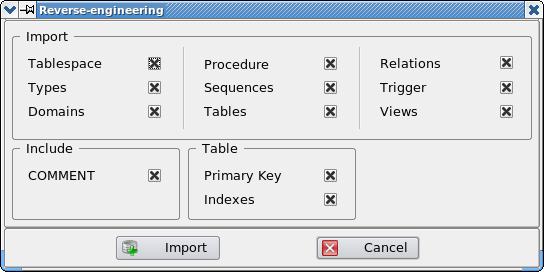
Selecting the item under the file menu, you can start the process of loading the structure from an existing database, this PostgreSQL on a server (local or remote). Before you make the connection, there is a window in which to determine which types of imported items. The feature loads all the objects related to which the connection is made, discarding all other elements even if present on the same database (eg system objects). Depending on the version of the PostgreSQL server in use, it is possible that some items are not available, regardless of the selection made in the settings loading.

The figure below shows the dialog box for setting the parameters of loading:


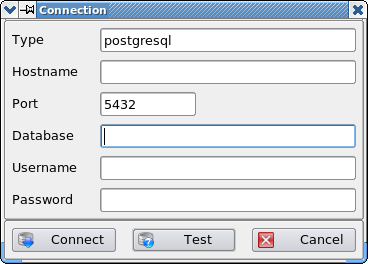
The login window allows you to specify the data required for connecting to the database server. Except password, all settings are saved in the configuration file of the program, and restored the next access. As shown in the figure below, the window provides the opportunity to enter all the parameters useful for the connection. According to the configuration of the server, some of these data can not be necessary or defer the Classic PostgreSQL. Through the Test button is unable to verify the correctness of input parameters, while the Connect button connects and start the process of loading. The Cancel button allows you to cancel the procedure, in this case the project is eliminated.


During loading from the database will see a progress bar, which will show the progress in real time. Once started, it is not possible to cancel loading, it is necessary to wait until the end of the process.

and their you got Done
Now you can create various port from and crate ERD kind of Digram or you can use Auto mated report like pde, html report

for more visit : http://pgdesigner.sourceforge.net/en/index.html
Hope this will help you
Regards